
Guide to LMS Integrations in 2026

LMS integrations are becoming a prerequisite for winning and retaining enterprise customers.
As more B2B companies build products that touch employee learning, training compliance, and professional development, LMS integrations have become a prerequisite for winning and retaining enterprise customers.
This guide covers what LMS integrations are, which systems matter, common use cases, and the most effective ways to build and maintain them — including how Kombo’s unified LMS API lets you integrate once and connect to 10 LMS platforms.
What are LMS integrations?
An LMS integration connects a learning management system, the platform where companies manage training, courses, and employee development, with another software application.
These integrations enable automated data exchange between the LMS and third-party tools. Instead of asking customers to re-enter data, integrations allow systems to share users, courses, enrollments, progress, and completion data programmatically.
LMS integrations fall into two categories:
- Customer-facing integrations: These connect your product with a third-party LMS used by your customers. For example, a content provider pushes its course catalog into a customer’s Cornerstone instance so learners can discover and launch courses without leaving their LMS.
- Internal integrations: These connect your own LMS with other business tools like HRIS, compliance systems, or communication platforms to automate workflows like employee onboarding or compliance tracking.
For B2B SaaS companies, customer-facing LMS integrations deliver the most strategic value. They are often a prerequisite for being considered in sales conversations, and they improve retention among connected customers.
Most common LMS systems in 2026
The LMS landscape is fragmented, with enterprise buyers and mid-market companies using different platforms. Here are the systems that matter most.
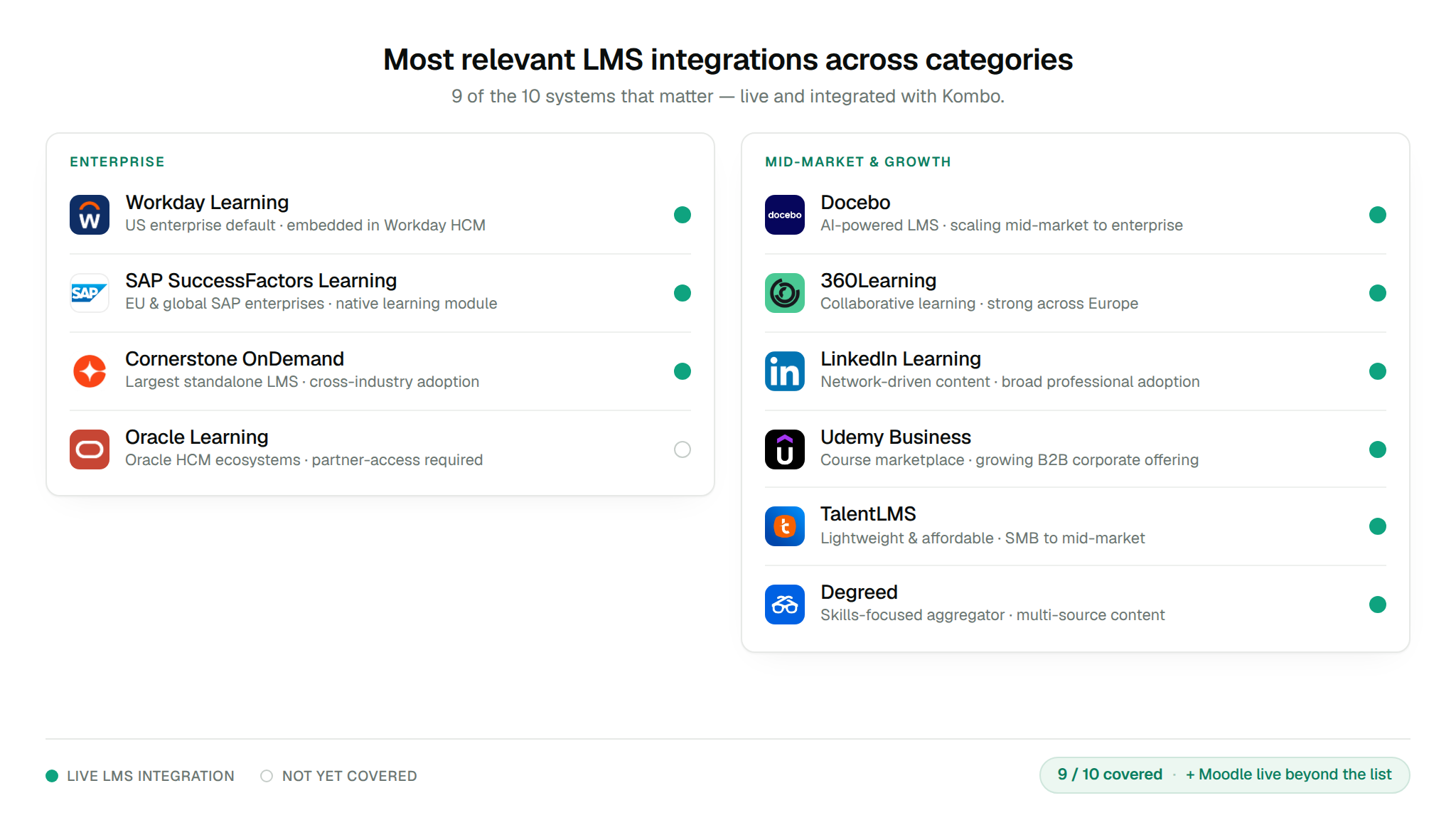
Enterprise
- Workday Learning: Deeply embedded in Workday’s HCM suite and very common in large enterprises, especially in the US.
- SAP SuccessFactors Learning: Dominant in Europe and among global enterprises already running SAP.
- Cornerstone OnDemand: One of the largest standalone learning platforms, widely used across industries.
- Oracle Learning: Part of Oracle’s HCM Cloud and common in Oracle-heavy enterprise environments.
Mid-market and growth
- Docebo: AI-powered LMS growing quickly in mid-market and enterprise segments.
- 360Learning: Collaborative learning platform popular in Europe and increasingly in the US.
- LinkedIn Learning: Leverages LinkedIn’s professional network, and is widely adopted for professional development.
- Udemy Business: Large course marketplace with a growing B2B offering for corporate learning.
- TalentLMS: Lightweight, affordable LMS used by SMBs and mid-market companies.
- Degreed: Skills-focused platform that aggregates learning content from multiple sources.
Common LMS integration use cases
Content distribution
Companies that create learning content such as compliance training, skills courses, or professional development programs need to push their course catalogs into their customers’ LMS platforms. This includes writing course titles, descriptions, metadata, and deep links so learners can discover and launch content directly from their LMS.
Learner provisioning
To deliver personalized learning experiences, your product needs to know who the learners are. LMS integrations let you read user data like names, emails, roles, departments, and manager hierarchies from the customer’s LMS and provision access automatically. This eliminates CSV imports and manual user creation by HR managers.
Progress and completion tracking
Once learners engage with your content, the results need to flow back to the LMS. Writing progress data, completion timestamps, scores, and certification status back into the customer’s LMS keeps learning records centralized. This is required for compliance reporting, performance reviews, and proving ROI to L&D and HR teams.
Course assignments and enrollments
Reading assignment and enrollment data from the LMS lets you automatically target the right learners. When an LMS admin assigns a course or enrolls a group of employees, your product can capture those signals and deliver the right content automatically.
Talent management and performance
Talent management platforms integrate with LMS systems to bring learning data into performance reviews, skills assessments, and career development plans. Linking learning outcomes to performance data helps organizations close skill gaps and make better career development decisions.
Compliance and security training
Compliance tools use LMS integrations to auto-enroll employees in required training programs, track completion rates, and report on compliance status. When an employee’s role or location changes in the HRIS, the LMS integration ensures they’re enrolled in the right training.
How to build LMS integrations
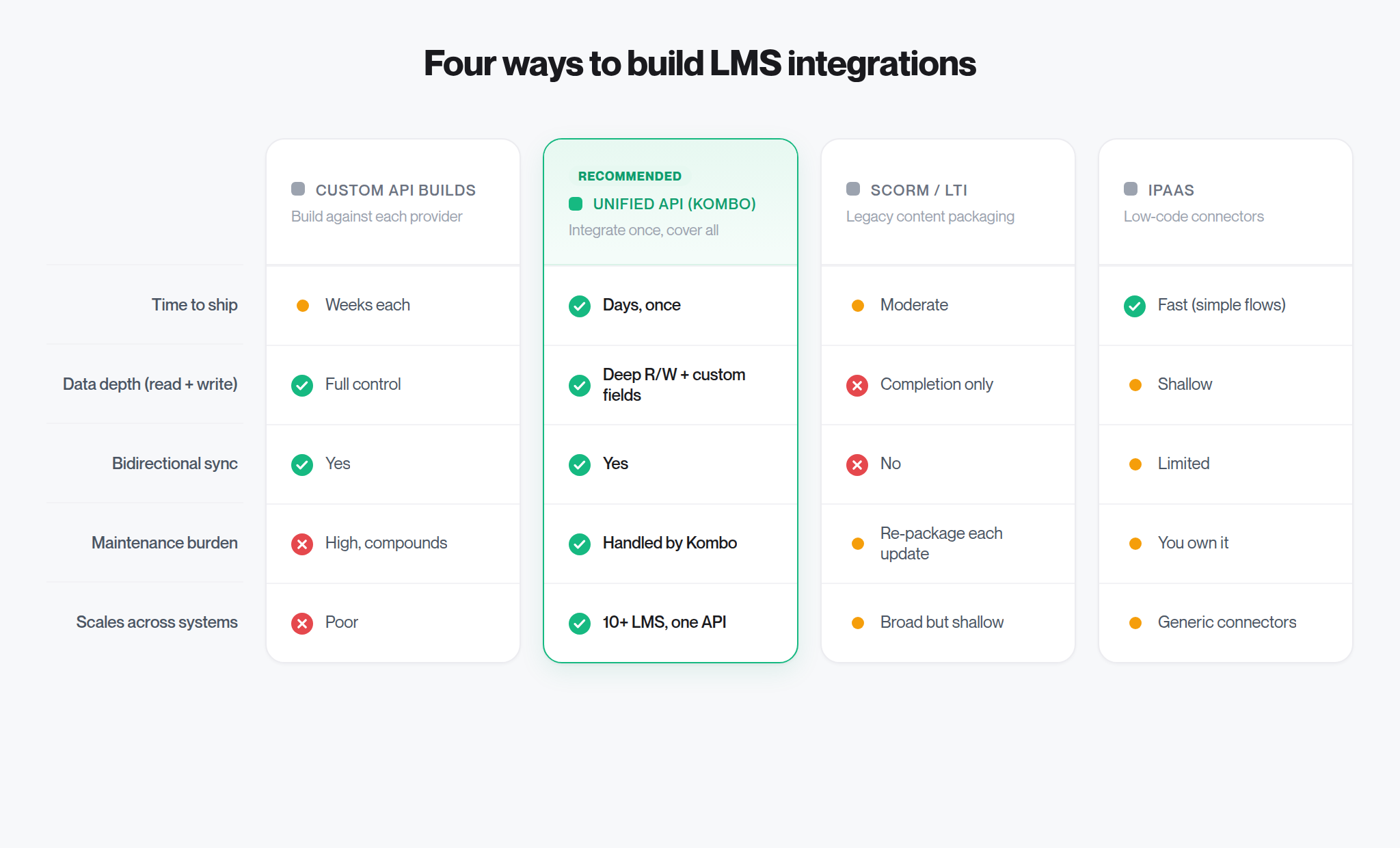
The right approach depends on how many integrations you need, your engineering bandwidth, and how critical LMS connectivity is to your product.
Custom API integrations
Most companies start by building directly against each LMS provider’s API. This gives you full control over the data model and user experience, but each integration requires significant development effort. Scoping the API, handling authentication, normalizing data, and QA often takes weeks.
Best for: Companies that only need one or two LMS integrations and have dedicated engineering resources.
Drawback: It doesn’t scale. Each new integration adds weeks of work, and maintenance costs compound over time.
Unified APIs
A unified API consolidates multiple LMS APIs behind a single standardized interface. You integrate once and get access to all supported LMS platforms through the same endpoints, data models, and authentication flow.
Kombo’s unified LMS API, for example, lets you read users, write courses, track progress, and sync completions across 10 LMS systems (including Workday, SAP SuccessFactors, Cornerstone OnDemand, 360Learning, LinkedIn Learning, and many more) through a single integration.
Best for: Companies that need to support multiple LMS platforms and want to ship integrations in days instead of months.
Drawback: You depend on the unified API provider’s coverage and depth. Choose a provider that specializes in your domain. Generic middleware typically cannot handle the edge cases of HR and learning data.
SCORM and LTI
SCORM (Sharable Content Object Reference Model) and LTI (Learning Tools Interoperability) are legacy standards for packaging and launching learning content across LMS platforms.
SCORM bundles content into a zip package that can be uploaded to any SCORM-compliant LMS. It’s widely supported but comes with significant limitations:
- SCORM implementations vary widely across LMS providers, and many deployments report compatibility issues.
- You lose visibility into learner behavior once content is deployed — there’s no tracking of engagement, retention, or adoption beyond basic completion.
- Updating content requires re-packaging and re-uploading across every customer instance.
LTI enables single sign-on and deep linking between learning tools and LMS platforms. It’s more modern than SCORM but requires each LMS to support the standard, and adoption of newer versions (LTI 1.3, LTI Advantage) is uneven.
Best for: Simple content distribution where you don’t need rich data exchange or real-time sync.
Drawback: No bidirectional data flow, and limited visibility into learner progress. Implementation quality and reliability vary across systems.
iPaaS solutions
Integration platform as a service (iPaaS) tools like Workato and Tray provide low-code connectors for various applications. They can handle basic data sync between an LMS and other tools.
Best for: Internal integrations with simple workflows (e.g., syncing a user list from your HRIS to your LMS).
Drawback: iPaaS tools are horizontal — they support thousands of app categories but lack depth in any one domain. For customer-facing LMS integrations that require normalized data models, write capabilities, and domain-specific error handling, they typically require your team to dig through documentation and own the maintenance.
Challenges of LMS integrations
Data normalization
Every LMS stores data differently. User fields, course structures, progress tracking, and enrollment models vary across platforms. Normalizing this data into a consistent format your product can consume requires significant domain expertise, especially when handling edge cases like custom fields, localized content, or multi-tenant configurations.
Authentication complexity
LMS platforms use various authentication methods, including OAuth 2.0, SAML, API keys, and proprietary flows. Enterprise systems like Workday and SAP often require specific admin permissions, security reviews, and credential scoping before you can access any data. Getting the right credentials from a customer’s IT team can take weeks.
Write operations
Writing data back (creating courses, updating progress, syncing completions) is significantly harder. Each LMS has different required fields, validation rules, and API behaviors for write operations. A course-creation call that works on Cornerstone might fail on Docebo if you don’t handle their specific field requirements.
Ongoing maintenance
LMS providers update their APIs, deprecate endpoints, and change data schemas. Each change requires investigation, code updates, and testing across your integration. Without dedicated tooling and monitoring, these changes can silently break integrations and erode customer trust.
SCORM fragmentation
If you’re relying on SCORM, the challenge is compounded by inconsistent implementations across LMS platforms. What works on one platform may fail on another, creating support overhead and a poor customer experience — regardless of whether the fault lies with your content or the LMS.
Benefits of LMS integrations
For B2B SaaS companies
- Expand your addressable market. Supporting more LMS platforms means you can serve more customers. Integration coverage is a deciding factor in enterprise procurement.
- Shorten sales cycles. When a prospect asks “Do you integrate with our LMS?” the answer needs to be yes. Pre-built integrations remove a common blocker from deal negotiations.
- Reduce churn. Automated data sync between your product and the customer’s LMS creates a sticky integration. Customers who rely on your LMS connectivity are less likely to switch.
- Free up engineering. Every hour spent building and maintaining LMS integrations is an hour not spent on your core product. Offloading integration complexity lets your team focus on differentiation.
For customers and end users
- Centralized learning records: Completion data, scores, and certifications flow back to the LMS automatically, removing the need for manual reporting.
- Better learner experience: Learners discover and launch content from their existing LMS without switching tools or creating new accounts.
- Improved compliance: Automated enrollment and tracking ensures employees complete required training, with audit-ready records stored in the system of record.
- Data-driven decisions: Real-time progress data enables L&D teams to identify skill gaps, measure training effectiveness, and prove ROI.
Simplify LMS integrations with Kombo
If you need to integrate with multiple LMS platforms, Kombo’s unified LMS API makes it possible with a single integration.
Kombo is the infrastructure layer for all people data. Our unified API is purpose-built for HR tech and covers 193 API-based HRIS and ATS integrations, including payroll through the HRIS API, plus 18 assessment and background-check integrations and 10 LMS integrations. Companies like Blinkist, Panopto, AG5, and Sprinto already use Kombo to connect with their customers’ LMS systems.
Here’s what Kombo’s LMS API offers:
- One API, 10 LMS systems: Read users, write courses, track progress, and sync completions across Workday, SAP SuccessFactors, Cornerstone OnDemand, 360Learning, LinkedIn Learning, Udemy Business, Moodle, TalentLMS, and more — through a single standardized interface.
- Full read and write support: Upsert your course catalog in bulk, track enrollments and progress, and write back completions. No more SCORM packages.
- Same depth as a direct integration: Map custom fields to your schema, access raw data from the source system, or call the underlying API directly with passthrough for edge cases.
- Enterprise-grade monitoring: See sync status, authentication issues, and errors across every customer connection from one dashboard. Set up webhooks to catch issues before they become support tickets.
- White-label by design: Kombo is invisible to your customers. Embed our white-labeled connection flow into your product and let customers connect their LMS in minutes.
- Domain expertise included: Our support engineers deeply understand HR and learning systems. You get dedicated Slack channels, sandbox access for most systems, and hands-on onboarding support.
Find out more:
All your integrations with one API
Integrate Kombo once – offer hundreds
of integrations off the
shelf to your customers.