
Launching Create Employee with Staffing Entities

Create Employee with Staffing entities is the easiest way to write hires into enterprise HRIS.
Tl;dr: Writing a new hire into an enterprise HRIS means finding the right combination among hundreds of legal entities, locations, and cost centers. Our new product abstracts this away, so every new hire automatically inherits the right combination.
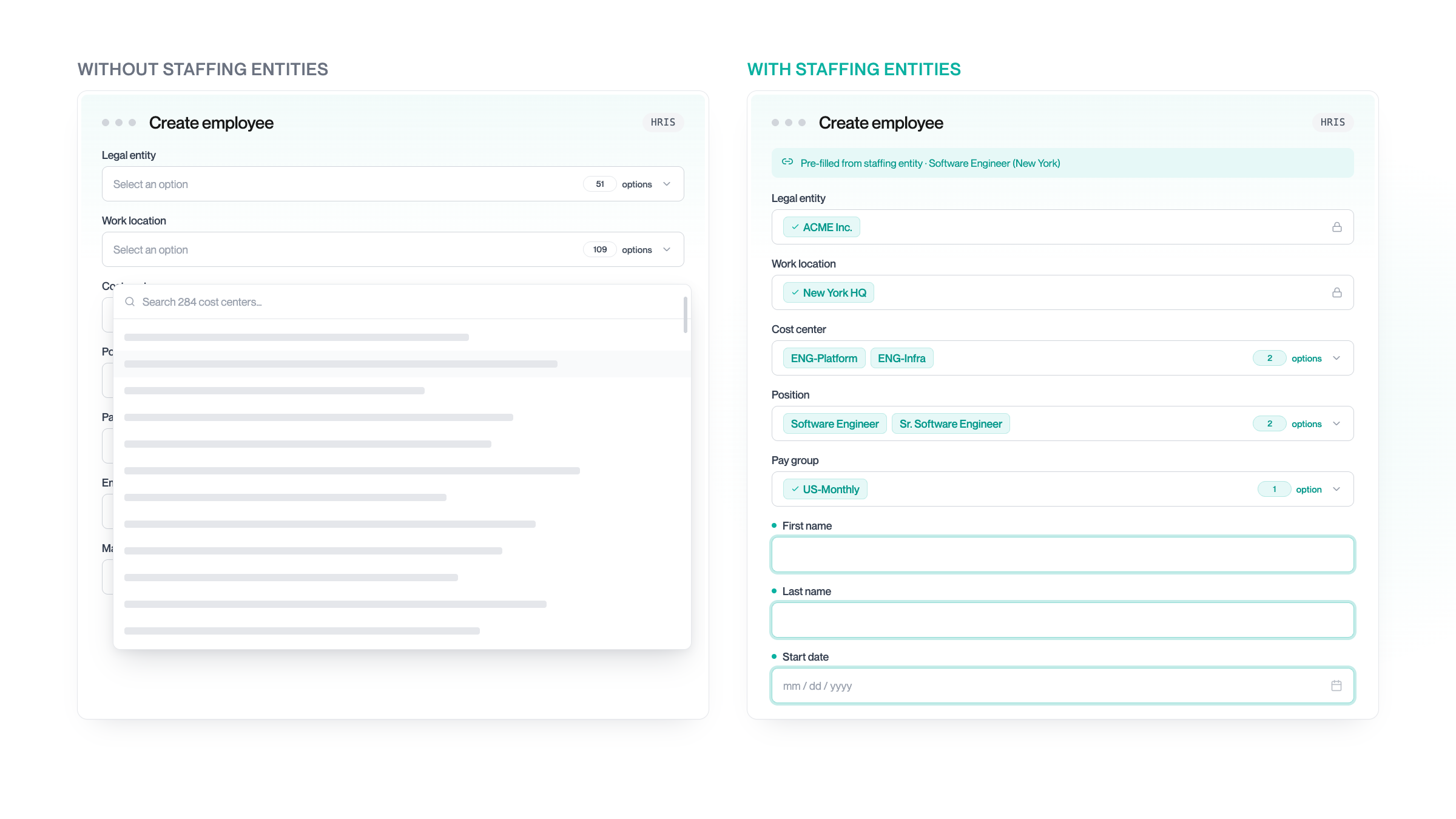
Writing hires into enterprise HRIS is a custom project
ATS, workforce management, and scheduling platforms are often expected by their customers to push new hires into their HRIS. This works fine for SMBs, but value mapping makes enterprise instances essentially a custom project.
A representative Workday HCM tenant can have hundreds of legal entities, work locations, cost centers, positions, and reporting lines. To create a hire, you have to place them in exactly the right combination of these.
When something breaks, new hires aren't created or land in the wrong spot. Onboarding stalls, downstream systems break, and either your engineers or the customer's HR team gets pinged to look into it.
But none of this needs to happen. The approved position inside the HRIS already carries the cost center, and the requisition is already tied to a legal entity. It just needs to be read from the HRIS and written back when the new hire is created.
That's what our Create Employee with Staffing Entities workflow solves for.
The foundation: one dynamic form across every HRIS
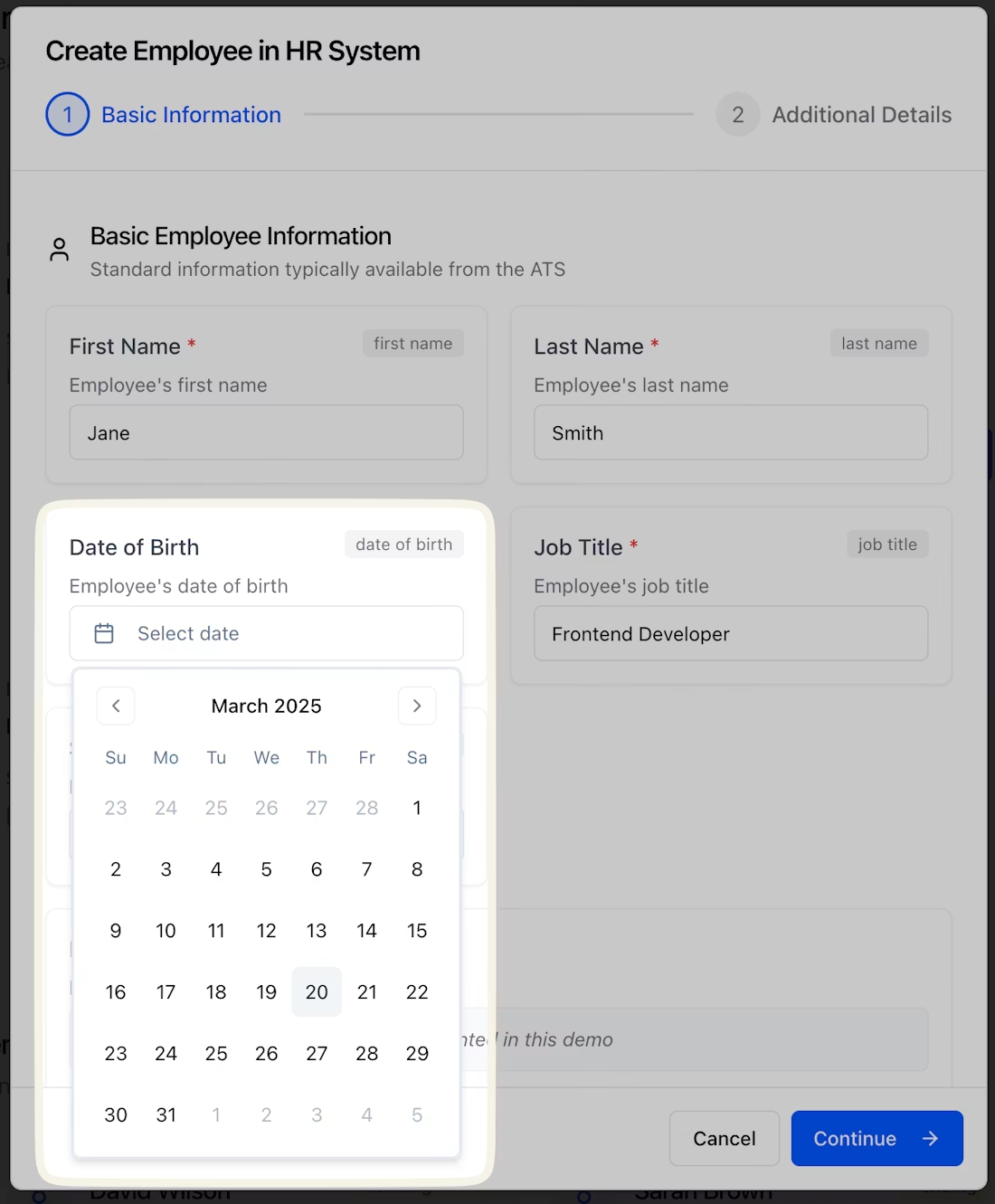
Create Employee V2, shipped a year ago, gives you two endpoints that work across every supported HRIS:
GET  /hris/employees/form    -> dynamic form schema for the connected HRIS
POST /hris/employees/form    -> submits the filled form to create an employee record
GET returns the schema for that specific customer instance: required fields, enums with live option IDs from the HRIS, and free text. The platform renders the form, the user fills it out, and writes it back.
We handle the complexity of writing employees on our side, like Workday's multi-step hire process, UKG's position automation, and SAP's nested objects.
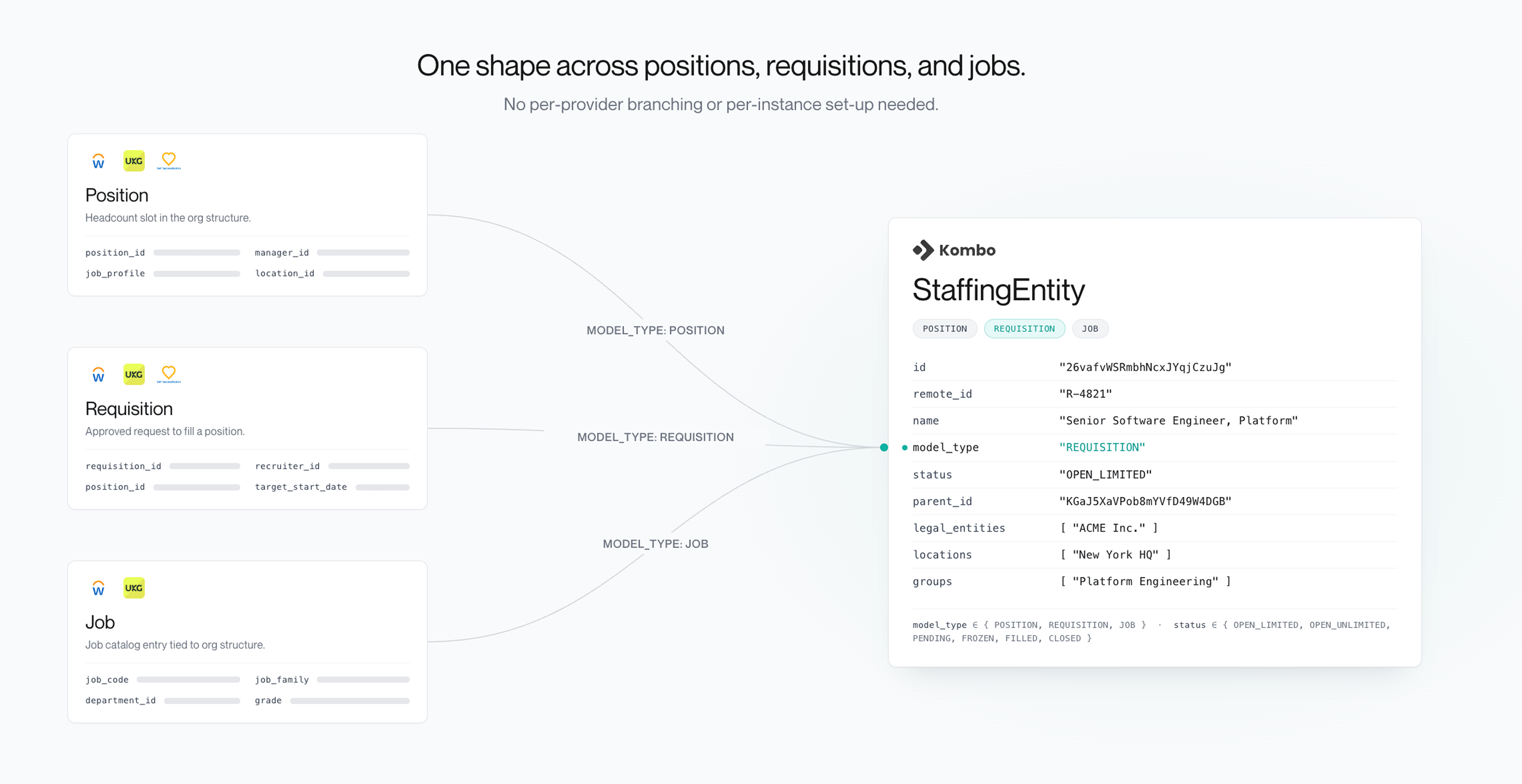
One shape for positions, requisitions, and jobs
The staffing entities data model extends this to ensure each hire lands in the right slot. It is our unified representation of approved hiring demand inside an HRIS, whether the system calls it a position, requisition, or job.
GET /hris/staffing-entities

{
  "id": "26vafvWSRmbhNcxJYqjCzuJg",
  "remote_id": "32",
  "name": "Software Engineer",
  "model_type": "POSITION",
  "status": "OPEN_UNLIMITED",
  "parent_id": "KGaJ5XaVPob8mYVfD49W4DGB",
  "description": "...",
  "employment_types": [
    { "remote_label": "Vollzeit", "unified_type": "FULL_TIME" }
  ],
  "number_of_openings": null,
  "legal_entities": [
    { "id": "le_...", "remote_id": "49", "name": "ACME Inc." }
  ],
  "locations": [
    { "id": "loc_...", "remote_id": "1348", "name": "Berlin HQ", "type": "OFFICE" }
  ],
  "groups": [
    { "id": "g_...", "remote_id": "49", "name": "Customer Success", "type": "TEAM" }
  ],
  "remote_url": "https://example.com/position/32",
  "remote_data": { ... }
}
Three model_type values exist because the underlying systems model
hiring demand differently:
- Position: a slot in the org structure that exists whether someone is sitting in it or not, and carries the metadata the HRIS needs to write a hire, such as location, legal entity, cost center, and reporting line.
-
Requisition: a formal, time-bound request to fill a
position, with an approval workflow attached. A requisition's
parent_idpoints to the position it was opened against. -
Job: a lightweight model for roles with high headcount
fluctuation, such as retail workers. Rather than tracking each slot
individually, a job groups an ongoing hiring need to cut administrative
overhead, often reflected in
status: OPEN_UNLIMITED.
To make it concrete: Workday leans on positions, which are sometimes tied to a requisition. SAP SuccessFactors leans on requisitions with attached positions. And UKG Pro leans on a mix of both, plus their lightweight job concept.
Read at requisition setup, and write back at hire
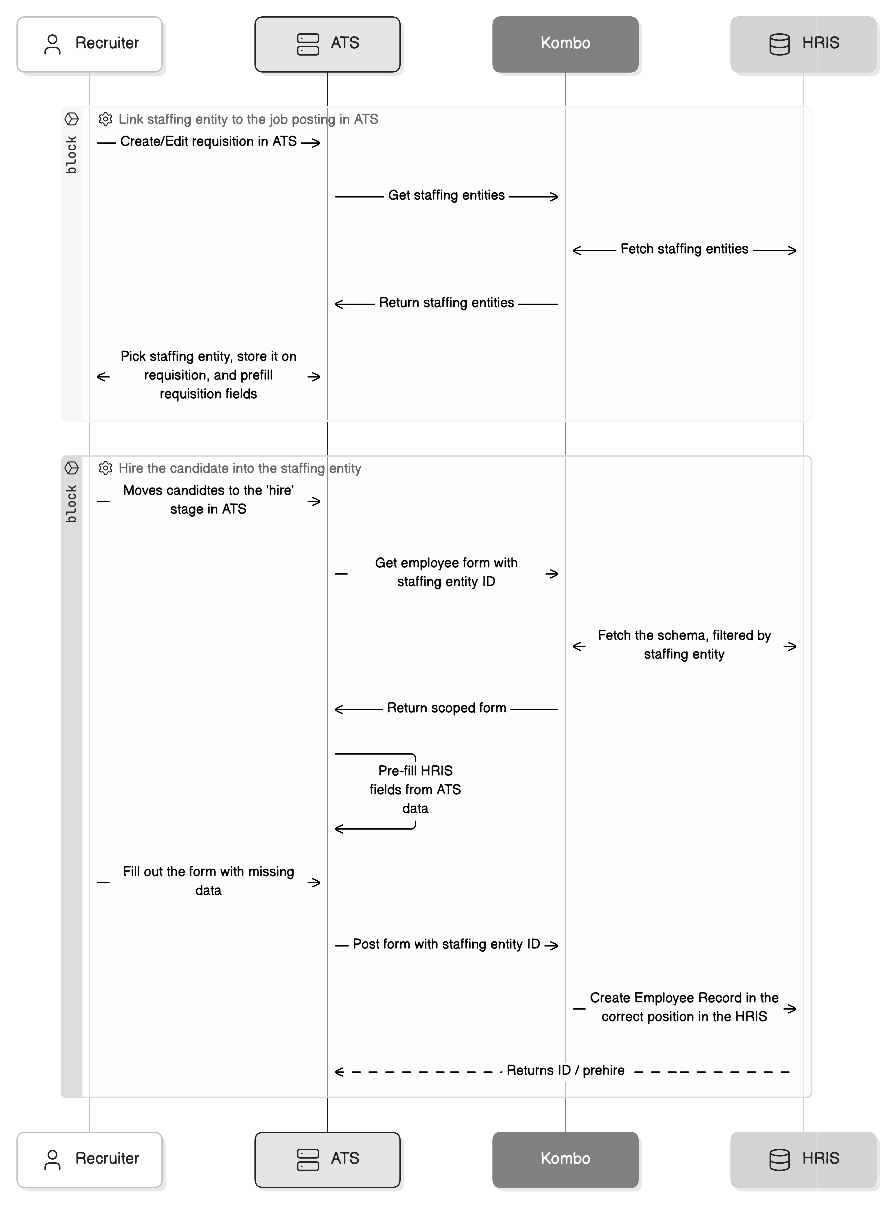
When the recruiter creates or edits a job posting inside the ATS, render a
staffing entity picker backed by GET /hris/staffing-entities.
This should be filtered to the entries the recruiter cares about: the entity's
name, model type as a badge, status, number of openings, and the first location
and legal entity. Ideally, also provide a link to remote_url so
users can verify the position in the HRIS.
Once an entity is selected, store its staffing_entity_id on the
job posting in the ATS and, optionally, prefill job posting fields from it.
When an application tied to that job posting reaches the hire stage, pass the
stored staffing_entity_id to both form endpoints:
GET /hris/employees/form?staffing_entity_id=...POST /hris/employees/form
{
"staffing_entity_id": "...",
"properties": {
"firstName": "Jane",
"lastName": "Doe",
"startDate": "2026-07-01"
}
}Kombo uses the ID to narrow the form and indicate to the HRIS which position or requisition the new hire fills. For our users, it prefills up to 40% of the form:
- Forms come back with fewer options: Dropdowns for relevant fields like legal entity or location narrow to the valid options for that slot, and irrelevant fields are omitted.
- New fields appear: Specific fields are shown that make sense in the context of a specific position or requisition. For a contingent worker, for instance, it would return fields like the supplier, agency, and contract end type that won't show up for a permanent hire.
Through Auto-fill Standard Fields via Unified Keys, Kombo automatically maps standard fields such as name and employment type across all HRIS. Together, these cover 80% and leave recruiters with just the final 20% to fill out.
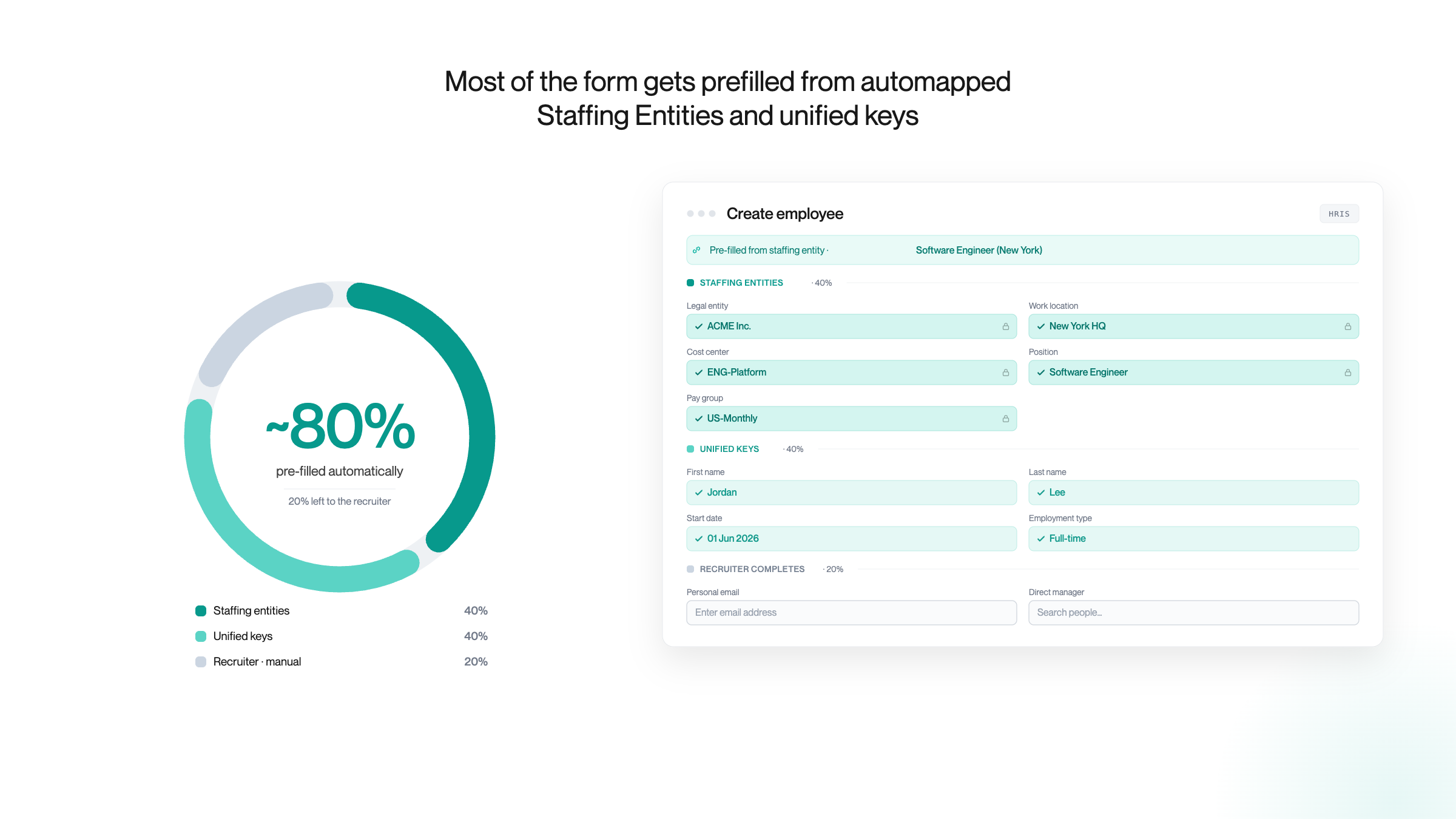
From per-customer mapping to enterprise-ready by default
For recruiters, it ensures that every new hire is tied to an approved position or requisition with the correct cost center, reporting line, and budget attached.
For ATS, workforce management, and scheduling platforms, it unlocks enterprise deals and prevents customer churn. Onboarding a new HRIS instance doesn't become a custom mapping project, and onboarding new enterprise customers doesn't require per-client mapping.
But we couldn't have said it better than our early users did:
Mapping fields per HRIS and per customer is the hardest part of exporting new hires from an ATS to customer HRISs. Kombo's Create Employee API gives us the tools to build forms that adapt to each customer's HRIS instance.
It reads the positions and requisitions already in the HRIS and auto-maps standard fields through unified keys, so much of the mapping takes care of itself.
Just as important, it gives us the building blocks to let each customer link their own ATS fields to their own HRIS fields. That frees our team to focus on the hiring experience instead of integration plumbing.
– Adriano Caloiaro, Staff Software Engineer, Greenhouse
What's next
Create Employee with Staffing Entities is currently in beta and being rolled out across HRISs. Workday and UKG Pro are live today, and SAP SuccessFactors, Personio, and Oracle HCM are coming next. The underlying Create Employee form is already live across 40+ HRIS providers.
We're also working to bring approved hiring demand into the flow even earlier. Instead of manually linking a staffing entity to each job posting, your customers sync open positions and requisitions directly from the HRIS. From the moment a role is approved, it's ready to be hired against in the ATS. That closes the loop from approved headcount in the HCM all the way to the new hire written back into it.
We're working closely with the ATS, workforce, and scheduling platforms working with enterprise customers. If that's you, book a call to see it live. For our existing customers, please talk to your CSM to enable staffing entities for your instance or request coverage for a specific HRIS.
For more context, check our implementation guide and data model documentation.
How create employee with staffing entities works
FAQ
How is this different from building it yourself or using an iPaaS like Workato?
With an in-house build or iPaaS, every HRIS is a separate project, and your team or your customer maps fields per customer. One of our customers spent roughly three months on a single Workday integration that way. Kombo gives you a single integration and a single data model across all supported HRIS, and the dynamic form removes per-customer and per-position mapping. This speeds up onboarding and prevents downstream issues and support load arising from incorrect mappings.
What's the difference between a position, a requisition, and a job?
They're three ways HRIS systems represent approved hiring demand: a position is a slot in the org structure that carries metadata like cost center and legal entity; a requisition is a time-bound, approved request to fill a position; and a job is an ongoing, open-ended hiring need. Kombo unifies all three into a single staffing entity model.
Do recruiters have to map fields or know which fields each HRIS needs?
No. The form is generated dynamically from the connected HRIS and returns exactly the required fields, valid options, and formats for the specific position in the customer instance you're writing into, so recruiters just fill in what's shown.
Does the recruiter pick the staffing entity, or is it pulled automatically from the HRIS?
Today, your user links a staffing entity ID to a job posting at setup, and that ID is reused when a candidate reaches the hire stage. Syncing open positions and requisitions directly from the HRIS is on our roadmap.
Does this also work for contingent or temporary workers?
Yes, contingent and temporary workers are supported today. Because the form adapts to the specific position, hiring a contingent worker surfaces the right fields, like supplier, agency, and contract end type, that wouldn't appear for a permanent hire.
Who creates the position or requisition: the recruiter or HR?
The position or requisition is created and approved upstream in the HRIS, usually by HR or finance during headcount planning. The recruiter simply links to that already-approved entity, so every hire inherits the correct cost center, legal entity, reporting line, and more.
All your integrations with one API
Integrate Kombo once – offer hundreds
of integrations off the
shelf to your customers.